Higgsfield Hotel Lobby: Guide and Alternative
Explore the Higgsfield Hotel Lobby workflow, required photos and reference clips, and when a two-photo rap video maker offers a suitable alternative.
The official Genjutsu guide never uses the name Hotel Lobby. These videos come out of Genjutsu, Higgsfield's video-to-video tool, which gives you two ways in: bring a short source clip and add photos of the people you want on screen, or start from a ready-made preset such as Studio Rap Performance. Below are both routes, the point where the public information stops, and a different way to start for anyone who would rather begin with two photos and a topic.
How People Make Hotel Lobby Videos on Higgsfield
Start at the Genjutsu interface. Higgsfield's official Genjutsu guide describes the tool as a way to rebuild part of a clip without a reshoot, and sets out five steps.
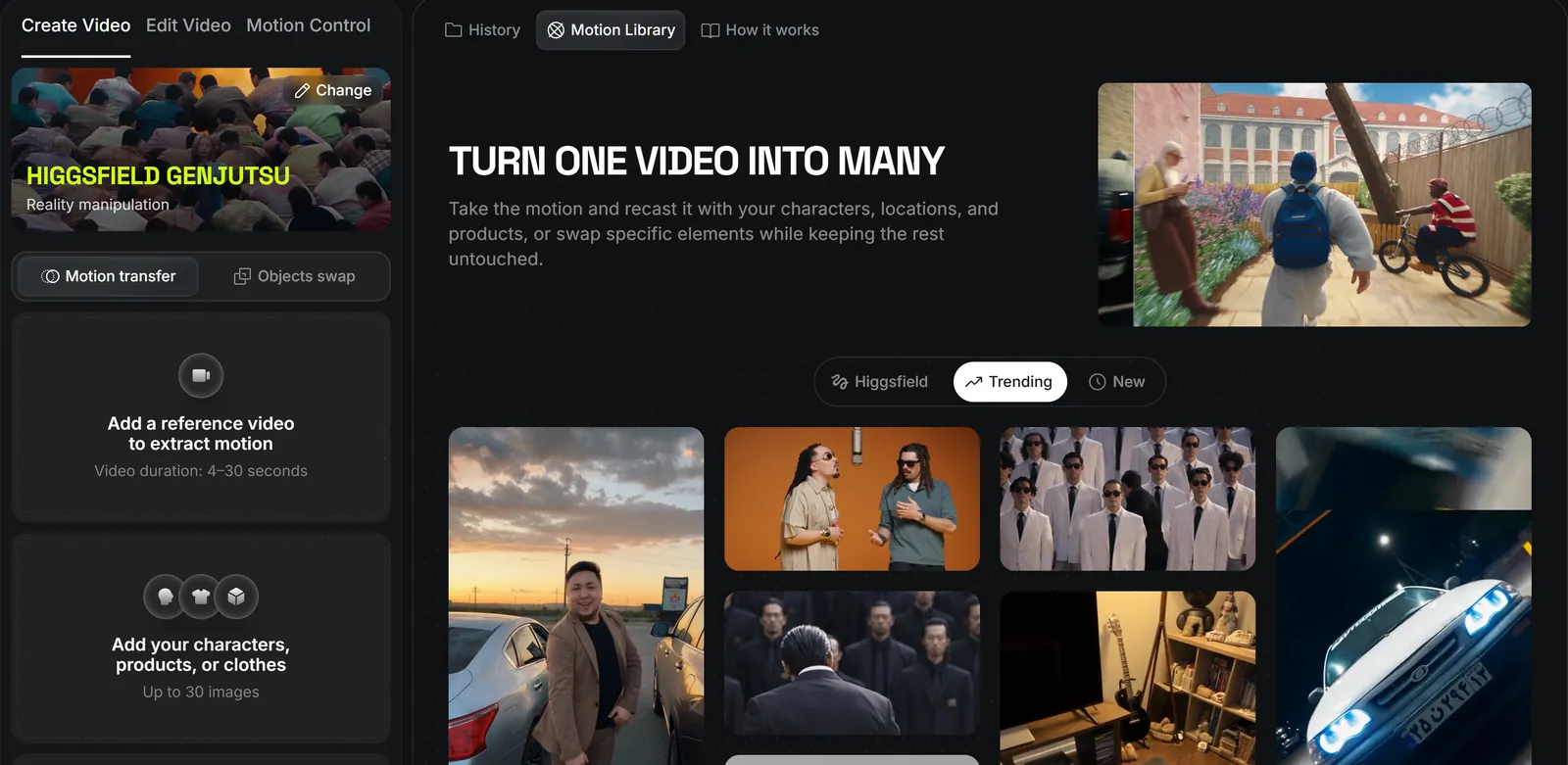
- Pick a mode. Motion Transfer takes the movement in your source video and applies it to a new character or a rebuilt scene. Object Swap replaces the one element you name and leaves the rest of the footage alone. If your people are replacing the performers, Motion Transfer is the mode to study first.
- Upload one source video, between 4 and 30 seconds long.
- Add reference images if you need them. The limit is 30 per generation, and they can show a character, an outfit, an object, a location or a style.
- Choose a preset or write a short description. The guide says a full prompt is not required and that a preset alone can drive the whole change.
- Generate and review. Check the resolution and the credit figure before you confirm. Then compare the result with your source footage and export the version you want to keep.
The guide embeds clips of a source video and both modes. Watch the official demo before you spend credits.
The second route is a shortcut that you can see in the interface but that the guide does not cover. Genjutsu's motion library includes a preset named Studio Rap Performance. Opening it shows an Input Media panel, with a video and two portraits in it, and a Recreate button. For a reader who only wants the orange-room look, this is the place to start, because it does not begin with filming your own clip.
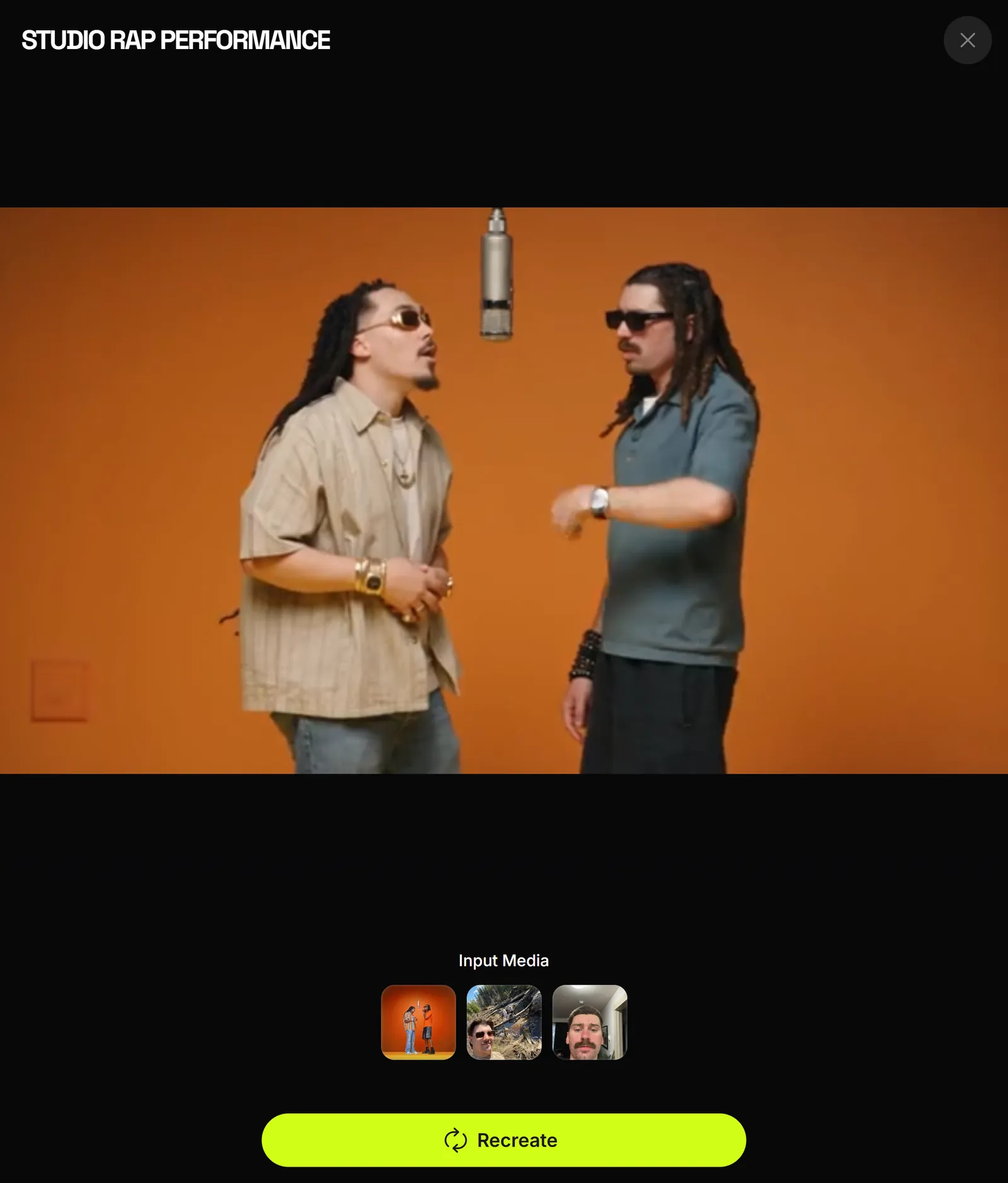
That is where the public trail ends. What Recreate asks for next, how the export works and what that preset costs are not in the documentation, so read each screen as you reach it, the credit figure above all. Find the preset by name, since the library's order can change.
What You Need Before You Start
- A Higgsfield account with credits. The guide prices both modes the same way, by length and resolution. Its example for a 15-second clip is 40 credits (about $2.00) at 480p, 104 credits (about $5.20) at 720p and 144 credits (about $7.20) at 1080p, with a note that costs may vary by generation settings. Those are the documented figures as of October 1, 2026.
- A source clip of 4 to 30 seconds, if you take the source-video route. The performance has to come from somewhere: film two friends trading lines at one microphone, or use footage you have the right to transform. On the preset route, check what Input Media asks you to add before you pay.
- Reference photos of each person. Pick sharp, evenly lit shots with the face unobstructed. The guide does not explain how references are matched to two performers in one clip, so make a first attempt at 480p, check both faces, and only then pay for a higher resolution.
- A preset or one sentence of direction, decided before you open the tool.
A Two-Photo Alternative for Your Own Duo
Both Higgsfield routes start from existing motion, either your clip or the preset's. AI Rap Duo starts from photos instead and generates a new performance, with new audio, around a short topic. It is our own tool, so weigh this section with that in mind.
You upload two photos, or one photo showing both people, choose the Hotel Lobby stage and add an optional topic of up to 120 characters, such as "two flatmates blaming each other for the empty fridge". The result is an MP4 of both people performing a short rap with newly generated audio. The standard setting (Mini, 720p, 12 seconds, 9:16) costs 10 credits, which is what the $4.99 Single purchase buys.
It does not copy Quavo and Takeoff's voices, their moves or their song. You get a new performance, not a remake. If that is what you want, you can make a video from two photos.
Which Workflow Should You Choose?
Start from what you want to end up with.
| Your goal | Higgsfield Genjutsu | AI Rap Duo |
|---|---|---|
| Remaking an existing performance | Built for it. The source clip sets the motion and the shot structure. | Not designed for it. It generates a new performance. |
| Motion-controlled retargeting | Motion Transfer follows the movement in your clip. | No motion input, so you cannot direct the moves. |
| Two friends starring from photos | Possible with reference images on a source clip, or by starting from a preset. | Built for it. Two photos, or one photo of both people, with new audio generated for the video. |
| A personalised topic | A short description directs the visual change. | An optional topic sets the theme of the generated rap. It is a guide, not a script sung word for word. |
The Studio Rap Performance preview shows two performers sharing one hanging microphone in an orange room. If matching that staging and movement matters most, or you already have footage and want control over it, Higgsfield is the stronger choice. If you would rather hand over two photos and one line about your friends, take the photo route.
Do not line the prices up side by side. Higgsfield's example is 15 seconds, the AI Rap Duo standard is 12, and the two tools produce different things.
Before You Share
- Permission. Get a yes from everyone whose photo appears, and a parent or guardian's consent for minors, and use source footage you filmed or have the right to use.
- Original song or original audio. "Hotel Lobby (Unc & Phew)" belongs to its rights holders, and an AI-generated rap is new audio, not that song. Laying the original track over a generated performance will not match the lip movement, and each platform applies its own music rules. The background is in the story of the Hotel Lobby song.
- No endorsement. Do not caption the video as official or as approved by Quavo, Takeoff's estate or COLORS.
Still deciding on a method? How to do the Hotel Lobby trend compares the options, the Hotel Lobby CapCut template guide covers the template route, and Hotel Lobby trend ideas lists 12 duos with a topic for each.